Cash Advance Apps That Charge Zero Fees on Advances
Free advances vanish when optional fees become spending habits.

The zero-fee promise on cash advance apps means several apps let users borrow before payday and repay from the next deposit with no interest, no mandatory charge, and no subscription. But "zero" comes with conditions attached, and whether it stays zero depends on choices the user makes after signing up. Running a lending product costs money even when the loan itself carries no interest: banks charge partner fees, fraud losses need covering, Plaid connections cost money to maintain, and customer support lines need staffing. Apps that skip the subscription fee still have to pay for all of that, so they recover it through other channels: optional instant-transfer fees, voluntary tips, interchange revenue off a connected debit card, or data partnerships. The free tier holds up fine for a user who picks standard delivery, skips the tip, and doesn't lean on a linked card for daily spending. It gets more expensive for a user who wants the money today, taps the tip prompt out of guilt, or doesn't realize a side feature carries its own charge.
The six apps that genuinely charge zero mandatory fees on advances
Four apps confirm a zero-mandatory-fee tier on cash advances: no subscription required to unlock the advance, no interest charged on the balance, and no late fee if repayment timing slips.
Current Paycheck Advance lends up to its published maximum with no membership, no subscription, no service fee, and no late fee. Standard delivery lands within three calendar days to a Current account, and there's no disbursement cap beyond the approved amount, so if you qualify, you can take the full sum in one request. An optional Instant Access fee applies if you want the money faster, and the app shows the variable amount before you confirm the request. It requires an active Current banking account.
EarnIn Cash Out lends up to a daily limit with no membership fee, no interest, and no mandatory fees of any kind. Standard delivery takes one to two business days. An optional Lightning Speed fee covers faster transfer, and the app asks for a tip during the flow, but you can decline it. The advance limit is set by income and account history, and because EarnIn requires consistent direct deposit from a traditional employer, it generally doesn't work well for gig workers or anyone paid mostly in cash tips.
MoneyLion Instacash lends up to a set limit with no mandatory fees at the base tier. Standard delivery takes one to five business days. An optional Turbo fee speeds up same-day delivery, and the tip prompt can be declined. Advance limits grow over time as deposit history builds up.
Gerald lends up to $200 with zero fees across the board: no interest, no subscription, no tips, and no transfer fees, including on instant transfers to select banks. The condition that unlocks it is different from the rest: a Buy Now, Pay Later purchase through Gerald's own marketplace, Cornerstore, has to happen first before the cash advance activates. Standard transfer is free regardless.
How Each App Sustains Itself
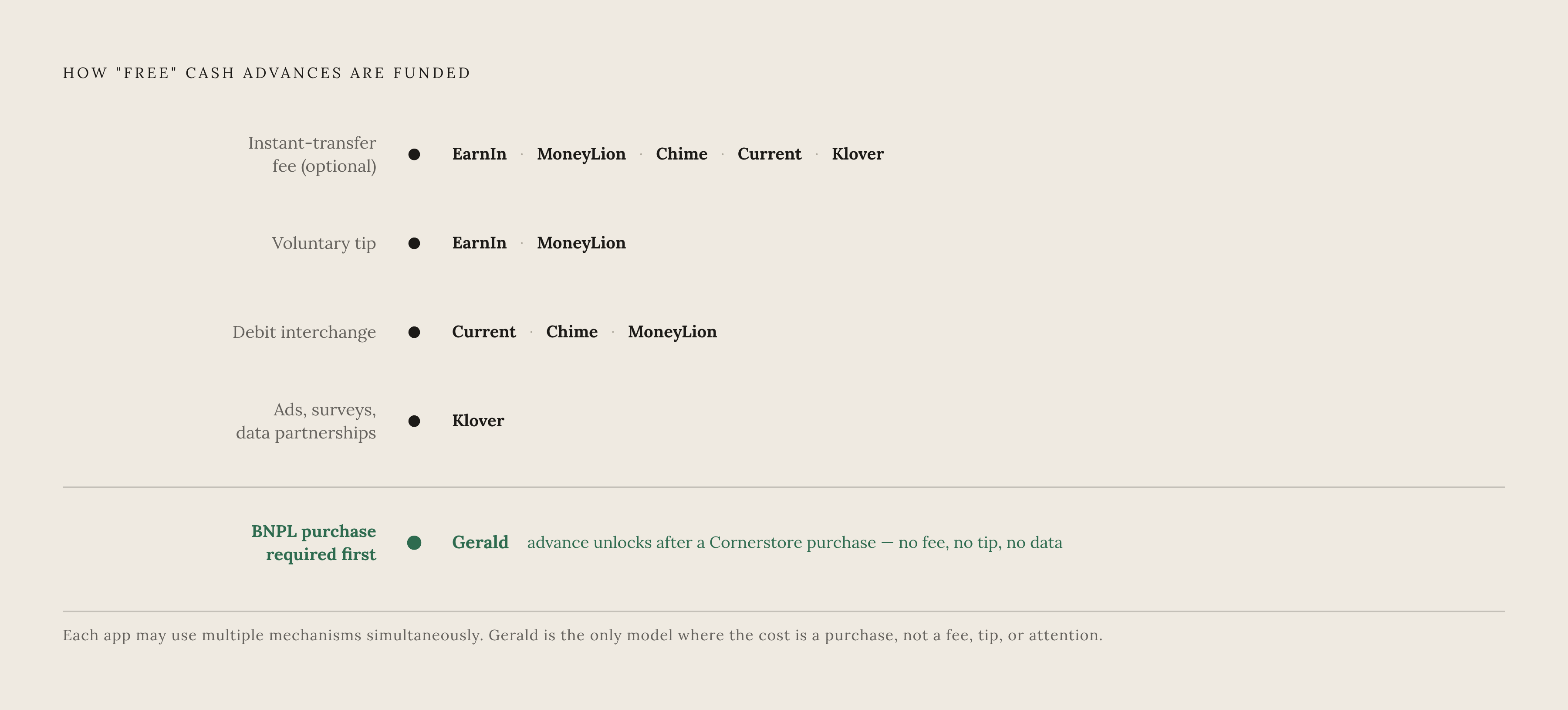
Each app's business model decides where costs show up later, so you need to understand the mechanics behind the free tier before you assume all six work the same way.
EarnIn, MoneyLion, Chime, Current, and Klover all lean on optional instant-transfer fees. The advance itself costs nothing if the user is willing to wait for standard delivery; speed is the only thing with a price tag. This is the most transparent model on the list, since the fee is quoted up front at the moment of the request and the user can simply decline it.
EarnIn and MoneyLion both request a tip during the advance flow. On the two platforms tracked here, declining costs nothing and doesn't shrink future advance limits. Some competitors tie tip history to limit growth more quietly, so the policy is worth checking on any app before assuming tips are purely optional everywhere.
Current, Chime, and MoneyLion also earn interchange revenue: a small cut from merchants every time a user swipes the platform's connected debit card. The advance product gets cross-subsidized by everyday spending on the banking side of the app, so it only works if you actually use that card day to day.
Klover takes a different approach. It funds the free tier partly through ad views, surveys, and data partnerships, using anonymized user data openly as part of the revenue engine. The user's attention and data activity are part of what keeps the advance free.
Gerald's free tier is funded by its retail side. The company monetizes through its BNPL marketplace, and the cash advance only unlocks after a BNPL purchase runs through that marketplace first. The free transfer functions as a reward tied to shopping on the platform, not a standalone product.
Interchange-funded apps want account loyalty. Data-partnership apps want attention and anonymized activity. Tip-and-express models want the user to accept some friction in exchange for skipping a fee. None of these trade-offs is hidden once a user knows to look for it, but each one changes what "free" actually costs in practice.
The optional costs that can quietly undercut a free advance
Three specific patterns are what actually turn a free advance into a paid one in practice.
The first is habitual use of instant-transfer fees. A few dollars for faster delivery feels trivial as a one-time charge. Taken every pay cycle, that same fee adds up like a recurring cost, and it scales with how often you use the advance rather than staying fixed, compounding differently than a flat monthly subscription would.
The second is the tip prompt that doesn't feel optional. Some apps design the tip field to look like a required step in the flow. The major apps covered here, EarnIn and MoneyLion among them, explicitly allow a decline with no penalty to future limits, but that's not guaranteed on every app in the category, so checking the actual policy before tipping out of habit is worth the thirty seconds it takes.
The third is an optional subscription layered on top of an otherwise free advance. One app's optional paid tier is clearly labeled as an add-on for extra features rather than a requirement for the advance itself, but a user who subscribes for a feature they end up not using rebuilds the exact subscription cost the free tier was supposed to avoid.
The category has a documented history of this kind of fee opacity turning into a regulatory matter. One regulator settled with a cash-advance provider in 2023 for $18 million over deceptive claims about instant cash access and a subscription that was difficult to cancel. That case isn't a comment on any of the six apps in this roundup, but it shows regulators have paid close attention to how fee and subscription structures in this category are disclosed and how easy they are to exit.
Dave offers a useful contrast, even though it isn't part of the zero-mandatory-fee tier. In 2025, Dave dropped its old tip-and-express-fee structure and replaced it with a single percentage-based service fee that has a stated floor and cap per advance. It also dropped the separate express fee for transfers into Dave Checking accounts, but an express fee still applies when you transfer to an external bank account. Dave didn't move to zero fees, it moved toward a simpler, more predictable fee, and that shift shows how much complexity in this category has been recognized, even by companies outside the free tier, as a problem worth fixing.
Finding the cash advance app that fits how you use advances
The right app depends on three things specific to how someone actually borrows: how often an advance gets used, how urgent the need usually is, and what accounts are already in place.
For an infrequent, non-urgent borrower, any of the six apps work fine, and the decision mostly comes down to advance limit. Current or EarnIn make sense for larger amounts; Gerald or Klover fit smaller ones. Standard delivery costs nothing on any of them, so a borrower who isn't in a rush keeps the cost at genuinely zero.
For a borrower who's usually not urgent but occasionally needs speed, the better pick is whichever app keeps the instant fee capped and predictable. Chime MyPay caps its instant fee at $5, which makes it the most cost-controlled option for the occasional rush. Current's instant fee is variable, but it's shown in the app before you confirm the request, so it still works fine as long as you check the number before committing.
For a frequent borrower, optional costs stack up the fastest, and that's where the cleanest structure matters most. Gerald charges zero fees across the board, including on transfers, with no tips and no express fees anywhere in the flow. The trade-off is the BNPL unlock requirement: advance access depends on a prior purchase through Gerald's marketplace, so it only fits a borrower whose spending pattern already includes that kind of shopping.
For someone who already banks on one of these platforms, the simplest move is to use the advance feature already built into that account. Chime MyPay is the natural fit for existing Chime customers, and MoneyLion Instacash works the same way for MoneyLion users. In both cases, the advance rides on infrastructure already in place, which cuts down on the extra data-sharing and setup that comes with adding a brand-new app.
Keeping any of these six apps actually free long-term comes down to a short set of habits: pick standard delivery unless waiting costs more than the express fee is worth, skip the tip on any app where declining doesn't touch the advance limit, and check any optional subscription against whether its features actually get used.
That kind of discipline needs someone, or something, watching the fee disclosures and the calendar every single cycle, and that's a tedious job to do by hand. It's the kind of ongoing, passive monitoring that a dedicated tracking tool is built for: checking whether an optional subscription tier got activated and then forgotten, flagging express fees that are piling up across cycles, and surfacing the finding with a specific dollar figure and a clear next step, so the user isn't the one stuck doing the audit. Passive monitoring like that keeps a free tier free for months, not just for the first advance.
What bank account connections mean for your data
Nearly every app in this category needs a bank link to underwrite the advance and confirm income, and that link raises a fair question about what the app can actually see and do with that access. The standard infrastructure behind these connections is Plaid, used by thousands of financial apps, and it connects in read-only mode. Plaid cannot move money out of an account, and bank login credentials stay encrypted throughout the connection.
That connection can stick around indefinitely: a Plaid link can stay active even after the app that created it gets deleted from a phone. Plaid can pull up to 24 months of transaction history if the connecting app specifically asks for the Transactions product, though the default window is shorter, and a balance check or identity check alone won't trigger a full transaction history pull. In practice, that means the scope of data shared can end up wider than what the immediate use case, verifying income for a cash advance, actually requires.
Two things make this manageable. Most major U.S. banks, including Chase, Bank of America, Wells Fargo, and Citi, now support Plaid's OAuth flow. Login credentials get entered directly on the bank's own website, kept separate from Plaid's systems. Any user can review and revoke every active Plaid connection at my.plaid.com, especially for any app that got used once and then forgotten on a home screen.
Cash advance apps aren't the only fintech products that keep their sustaining mechanics quiet behind a "free" label. Compass, an AI-powered background monitor that connects to bank and shopping accounts, was built to avoid that same opacity: it surfaces specific savings opportunities with exact dollar amounts and a clear next action, so a user can see precisely what they're getting and how the tool pays for itself. The risk with optional-fee structures across this whole category is that the cost compounds quietly: an express fee gets paid out of habit, tips pile up across several advances, or a linked card creates account lock-in nobody noticed happening. That's the same kind of silent leak that proactive account monitoring is built to catch, and Compass watches for duplicate charges, bills that quietly raised their rate, and charges a user never authorized in the first place, catching them before they add up to real money lost.
Choosing read-only access paired with OAuth login and checking active connections periodically keeps any app in this category within a sound default. The ability to see account data without the ability to move money is a real security boundary, and it's the same standard that legitimate financial monitoring tools, Compass included, operate under. It's also the right question to ask of any app before linking a bank account to it: can this see the money, or can it touch it.